The MacBook Pro 16 (M3 Max) is the best laptop for graphic design overall, thanks to its colour-accurate display and powerful performance. For Windows users, the Dell XPS 17 is the top pick, and for students on a budget, an Acer Aspire (with 16GB RAM) handles design work without the high price.
If you’re a graphic designer or creative professional, choosing the right laptop is one of the most important decisions you’ll make. You need a machine that’s fast, has a sharp and colour-accurate display, and runs all your design software smoothly, whether that’s Adobe Photoshop, Illustrator, CorelDRAW, or Figma.
In this guide, I’ve listed the top 5 laptops for graphic design in 2026, along with budget-friendly options for students and beginners in India. For each laptop, you’ll find the key specs, who it’s best for, honest pros and cons, and an approximate price in rupees. Let’s find the right one for you.
Also recommended for video editors – check out our list of the best laptops for video editing if you need something tailored for post-production work.
What to Look for in a Graphic Design Laptop
Before the picks, here are the five things that actually matter. Understanding these helps you choose well even if a specific model sells out.
- RAM: 16GB is the real minimum in 2026. 8GB runs design apps but struggles with large, multi-layer files. For heavy 3D or video, go 32GB.
- Display colour: aim for 100% sRGB at minimum; 100% DCI-P3 (often OLED) is ideal so your colours match the final print.
- Storage: always an SSD, never an HDD. Start at 512GB or more.
- Processor: Apple M-series, Intel Core Ultra / recent Core i7, or AMD Ryzen 9 all handle design well.
- Graphics: integrated graphics are fine for 2D work; a dedicated GPU helps with 3D, motion graphics and video.
In plain terms: RAM and screen colour matter more than chasing the fastest processor.
Summary table: top 5 graphic design laptops
| Laptop | Processor | Graphics | Display | RAM | Best For | Price (₹, approx) |
| MacBook Pro 16 | Apple M3 Max | 30-core GPU | 16.2″ Retina | Up to 64GB | Professionals | ₹2,75,000+ |
| Dell XPS 17 | Intel Ultra 9 | RTX 4070 | 17″ UHD+ | 32GB | Windows creatives | ₹2,60,000+ |
| ASUS ProArt Studiobook 16 | Ryzen 9 | RTX 3070 | 4K OLED | 32GB | Colour accuracy | ₹1,50,000+ |
| Surface Laptop Studio 2 | Core i7-13700H | RTX 4050 | 14.4″ Touch | 32GB | Drawing/illustration | ₹2,00,000+ |
| HP Spectre x360 16 | Core i7-12700H | Iris Xe | 3K+ OLED | 16GB | Portability/students | ₹1,25,000+ |
Prices are approximate and change often. Always check the current price on Amazon.in or Flipkart before buying.
1. MacBook Pro 16 (M3 Max) – Best Overall for Creative Professionals

Best for: Professional designers handling 3D rendering, large files, and high-resolution photo editing.
Specifications:
- CPU: Apple M3 Max (14-core CPU, 30-core GPU)
- RAM: Up to 64GB Unified Memory
- Storage: 1TB SSD
- Display: 16.2-inch Liquid Retina XDR, 3456 x 2234
- Battery: Up to 22 hours
The MacBook Pro 16 with the M3 Max chip delivers exceptional performance for designers, handling intensive tasks like 3D rendering and high-resolution editing with ease. Its Liquid Retina XDR display offers outstanding colour accuracy, making it ideal for professionals working in Adobe Creative Suite. If design is your full-time profession, this machine will last you years.
My younger sister shared this experience: during her three-month stint editing high-res wedding photos, the Liquid Retina XDR display on the 16″ MacBook Pro gave her so much confidence in colour grading – even under daylight in a sunny studio.
Pros: exceptional M3 Max performance; colour-accurate display; long battery life; premium build.
Cons: premium price; limited port selection.
Price (India): approx ₹2,75,000+ depending on configuration.
2. Dell XPS 17 (2025 Edition)– Best Windows Laptop for Graphic Design

Best for: Designers who prefer Windows and want a large, colour-accurate screen.
Specifications:
- CPU: Intel Core Ultra 9
- GPU: NVIDIA GeForce RTX 4070
- RAM: 32GB DDR5
- Storage: 1TB SSD
- Display: 17-inch 4K UHD+ (3840 x 2400), 100% Adobe RGB
- Battery: Up to 14 hours
The Dell XPS 17 combines powerful performance with a stunning 4K display, making it a top choice for designers who prefer Windows. Its large 17-inch screen and 100% Adobe RGB colour coverage are excellent for detailed design work, and the RTX 4070 GPU handles demanding applications smoothly. It’s a true desktop-replacement laptop for serious creative work.
Still choosing between brands? Our Lenovo vs Dell laptops comparison can help you decide which suits your design needs.
Pros: high-resolution, colour-accurate display; powerful CPU and GPU; premium professional build.
Cons: heavier than most; premium pricing.
Price (India): approx ₹2,60,000+.
3. ASUS ProArt Studiobook 16 OLED- Best for Color Accuracy and Creative Professionals
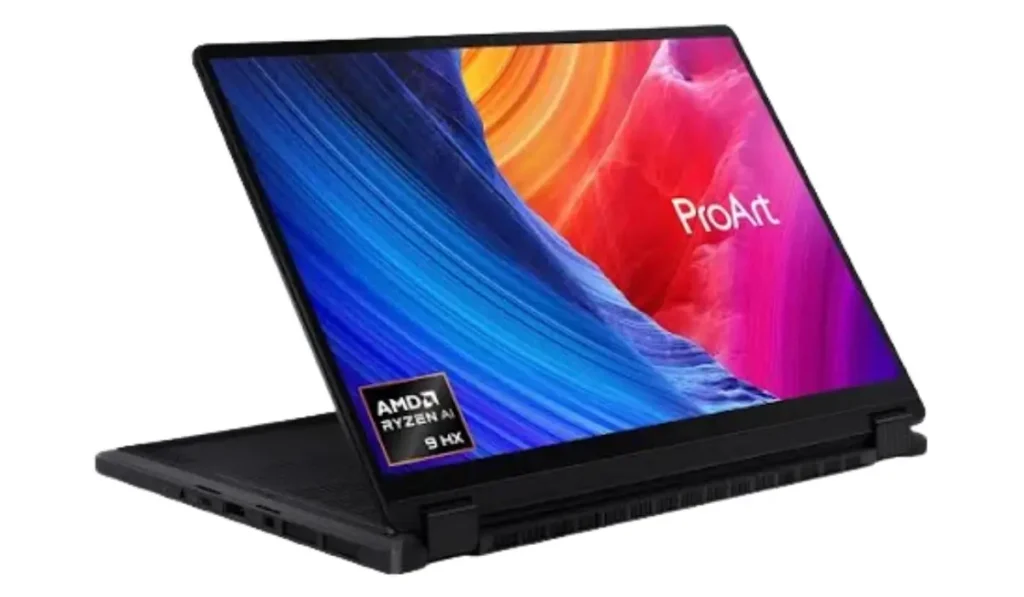
Best for: Creative professionals who want a factory-calibrated, colour-accurate OLED screen.
Specifications:
- CPU: AMD Ryzen 9
- GPU: NVIDIA GeForce RTX 3070
- RAM: 32GB DDR4
- Storage: 1TB SSD
- Display: 16-inch 4K OLED, 100% DCI-P3, Pantone Validated
- Battery: Up to 10 hours
The ASUS ProArt Studiobook 16 is built specifically for creative professionals. Its 4K OLED display offers 100% DCI-P3 coverage and Pantone validation, which means the colours you see are reliable and true to print. The unique ASUS Dial gives intuitive control inside creative software, and the powerful hardware keeps design apps running smoothly. For colour-critical work like branding and print design, this is one of the best Windows options available.
Pros: exceptional colour-accurate OLED display; strong performance; handy ASUS Dial control.
Cons: shorter battery life; slightly heavy.
Price (India): approx ₹1,50,000+.
4. Microsoft Surface Laptop Studio 2–Best 2-in-1 Laptop for Designers and Digital Artists
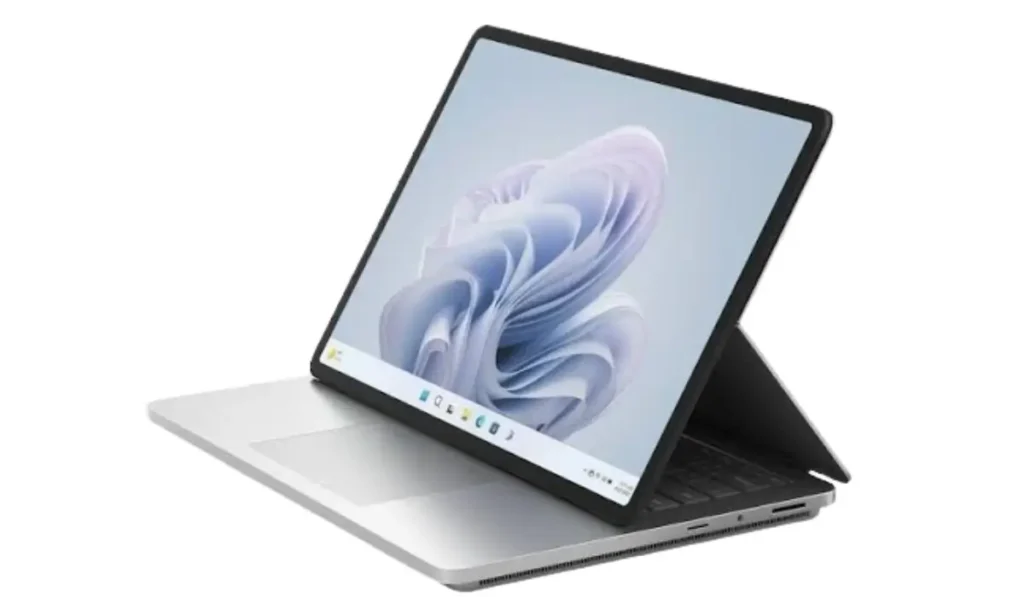
Best for: Digital artists and illustrators who want a touchscreen with stylus support.
Specifications:
- CPU: Intel Core i7-13700H
- GPU: NVIDIA GeForce RTX 4050
- RAM: 32GB LPDDR5x
- Storage: 1TB SSD
- Display: 14.4-inch PixelSense Flow, 2400 x 1600, 120Hz
- Battery: Up to 18 hours
The Surface Laptop Studio 2 stands out for its flexible design. The screen pulls forward and lies flat, turning the laptop into a drawing surface ideal for illustrators and digital artists who work with a stylus. The 120Hz touchscreen feels responsive for sketching, and the internals are powerful enough for everyday design and light video work. If drawing is a big part of your workflow, this 2-in-1 is worth the premium.
Pros: versatile 2-in-1 design with stylus support; smooth high-refresh touchscreen; strong performance.
Cons: limited ports; premium price.
Price (India): approx ₹2,00,000+.
5. HP Spectre x360 16- Best for Portability and Design Students

Best for: Students and designers who want a portable 2-in-1 with a great screen and long battery life.
Specifications:
- CPU: Intel Core i7-12700H
- GPU: Intel Iris Xe Graphics
- RAM: 16GB DDR4
- Storage: 1TB SSD
- Display: 16-inch 3K+ OLED, 3072 x 1920
- Battery: Up to 17 hours
The HP Spectre x360 16 balances portability and performance, with a beautiful OLED display and long battery life. Its 2-in-1 design adds flexibility for note-taking and light sketching, making it a great fit for design students and professionals on the move. It uses integrated graphics, so it’s best for 2D design rather than heavy 3D or video work.
One of my friends shared this experience: on campus, they wrote notes, edited vector icons, and streamed lectures and the battery easily lasted a full day (around 8 hours) without needing the charger.
Pros: beautiful high-resolution OLED display; long battery life; flexible 2-in-1 design.
Cons: integrated graphics limit heavy tasks; limited upgrade options.
Price (India): approx ₹1,25,000+.
Best Budget Laptops for Graphic Design Students in India
The five laptops above are premium machines for professionals. But if you’re a student or just starting out, you don’t need to spend over a lakh. Focus on three things: 16GB RAM (or upgradeable to it), an SSD, and a screen with 100% sRGB. These options handle Canva, Figma, Photoshop and Illustrator comfortably for learning and freelance projects:
- Acer Aspire (₹45,000–60,000): a popular budget pick. Add a 16GB RAM upgrade and it handles Photoshop and Lightroom for basic to intermediate work.
- ASUS Vivobook 16 (₹55,000–70,000): good display options and solid everyday performance for design students.
- Dell Inspiron 14 (₹50,000–65,000): reliable and easy to use for lighter design work in Canva, Figma and Photoshop.
A smart tip: buy a capable budget laptop now, and invest in a colour-accurate external monitor later, once you’re earning from design.
Mac vs Windows for Graphic Design – Which Should You Choose?
Both are excellent in 2026. macOS is loved for its smooth performance with creative software and great colour straight out of the box, which is why the MacBook Pro tops our list. Windows offers more hardware choices and better value, plus touchscreen and stylus options for digital artists like the Surface and HP picks above. Since most design software runs on both, choose based on your budget and the ecosystem you’re comfortable with.
Conclusion: Which Laptop Should You Choose?
Each of these laptops brings something different. If you want the best overall performance and colour accuracy, the MacBook Pro 16 is the top choice. Prefer Windows with a large screen? The Dell XPS 17 is for you. Need the best colour for print work? The ASUS ProArt Studiobook. Love drawing? The Surface Laptop Studio 2. Want portability for studies? The HP Spectre x360. And if you’re on a tight student budget, an Acer Aspire with a RAM upgrade gets you designing without overspending.
Whatever you pick, prioritise 16GB RAM, an SSD, and a colour-accurate screen; those three things matter most for design work.
Want powerful performance without breaking the bank? Check out the best gaming laptops under $1500 many of which double as excellent graphic design machines too!
FAQs
-
What is the best laptop for graphic design in 2026?
For top-tier performance, the MacBook Pro 16 with M3 Max is the best overall choice for professionals handling complex design tasks. For Windows users, the Dell XPS 17 is the top pick.
-
Which Windows laptop is good for Adobe Illustrator and Photoshop?
The Dell XPS 17 offers a powerful Intel Core Ultra 9 CPU with an RTX 4070 GPU, making it ideal for Adobe Creative Cloud. The ASUS ProArt Studiobook is another strong option for colour-accurate work.
-
Is a 2-in-1 laptop good for graphic design?
Yes. The Microsoft Surface Laptop Studio 2 and HP Spectre x360 are great for digital artists who benefit from touchscreen and stylus input with flexible usage modes.
-
How much RAM do I need for graphic design?
16GB is the recommended minimum in 2026. 8GB can run design apps but struggles with large files. For heavy 3D or video work, choose 32GB or more.
-
Can students do graphic design on a budget laptop?
Yes. A budget laptop with 16GB RAM (or upgradeable), an SSD, and a 100% sRGB screen like the Acer Aspire handles Photoshop, Illustrator and Figma well for students and beginners.